Digital identity verification should be inclusive, intuitive, and accessible to all, regardless of disability. That’s why, in 2025, we set out to enhance our solutions to comply with the latest European accessibility standards.
Every year, we process over 100 million documents, which is approximately the same number of people that are registered as disabled in Europe. In fact, one in four European adults are registered as physically or cognitively disabled, with many unfortunately living without proper access to basic, essential services.
According to the European Council of the European Union, 29% of those with disabilities are at risk of poverty or social exclusion and are four times more likely to have unmet healthcare needs compared to the able-bodied.
Technology can unlock a world of opportunity for those with disabilities, including enhancing independence, improving communication, and granting greater access to information.
For those with sight, hearing, mobility or cognition issues, being able to access online services provides an invaluable lifeline; an alternate entry point to essential services like banking and healthcare that are necessary to live a full and rich life that everyone is entitled to.
Accessing online services also provides a much-needed window to the outside world, allowing people to feel part of a community and benefit from education and remote work opportunities.
Christophe Chaput, Senior Product Owner at IDnow
Unfortunately, however, not every website or app has been designed in a user-friendly way, especially for those with disabilities. The European Accessibility Act (EAA), which came into force in June 2025, set out to change all that.
Discover how IDnow has helped address skin tone bias in global facial verification systems in our blog, ‘Breaking down biases in AI-powered facial verification.’
What is the European Accessibility Act?
The EAA is an EU directive aimed at improving technological inclusivity for a wide range of products and services, including information and communication technologies, financial services, transportation, emergency services, and e-commerce services.
It mandates that all products and services are designed to be accessible to people with disabilities, particularly those related to sight, hearing, mobility, or cognition. Here are the EAA’s three key requirements:
- Accessibility of digital services and websites.
Businesses must ensure their websites, mobile apps, and digital content are accessible. This includes screen reader compatibility, keyboard navigation, and text alternatives for non-text content, such as images and videos.
- Accessible design of products.
Electronic devices such as smartphones, computers, ATMs, ticket machines, and e-readers must be designed to be usable by people with disabilities. This means including features like tactile buttons, audio output and adjustable font sizes or contrast settings.
- Accessibility of communication and customer support.
Companies must provide accessible customer service channels (e.g., chat, phone, email) for people with disabilities. Information about products and services must also be available in accessible formats like large print, braille, or easy-to-read versions.
What this means for our customers.
In 2025, to ensure our products and services are inclusive, we invested in multiple initiatives — including our design system, ‘Sunflower’, which embeds accessibility at the very core of our solutions. Sunflower ensures:
- Adaptability: Just as a sunflower adapts its position to face the sun, our design system seamlessly adjusts to the needs of the user, providing an interface that is intuitive, responsive, and customized.
- Structured Core: Like the well-defined core of a sunflower, IDnow’s Sunflower design system has a solid foundation, ensuring consistency and cohesion in every aspect, from color schemes to typography.
- Versatility: The design elements within Sunflower are versatile, capable of being arranged in various configurations to cater to a multitude of user interfaces and experiences.
A question we often get asked is how can we be so sure that our solutions are able to be used by everyone? Indeed, there are many different types of disability and different types of hardware and online services.
After all, a person with a specific disability may need specific tools, devices or software to use as standard interfaces may not accommodate their unique needs or challenges. They may need specific hardware like a screen reader, voice command, braille reader, or other types of hardware. To ensure compatibility with all manner of tools, we follow the Web Content Accessibility Guidelines (WCAG) 2.1, which are a set of recommendations for making web content more accessible.
Is there an accessibility app for that?
So, what does accessibility look like in practice? Well, it’s important to break accessibility down into two key levels: the visible and the invisible.
The visible part: The user interface.
Of course, the user interface (UI) and graphical layout of the application are all that users tend to see and interact with. So, when we talk about accessibility, we’re referring to elements like:
- Contrast ratios between text and background colors
- Font size and scalability, especially for users who increase text size on their devices
- Clear icons and labels
- Consistent layout and visual cues that help users navigate
These design choices ensure that users with visual impairment, color blindness, or cognitive challenges can still perceive and interact with the interface effectively. It’s about making sure everyone can see and understand what’s happening on the screen. Our graphical interface has been completely overhauled to integrate accessibility requirements from the ground up. This includes improvements such as:
- Optimized color contrasts for better visibility
- Scalable typography for enhanced readability
- Structured navigation and meaningful labels for screen readers
- Improved keyboard navigation and focus management
These changes not only help users with disabilities navigate and interact with the application more easily, but they also create a smoother, clearer experience for everyone.
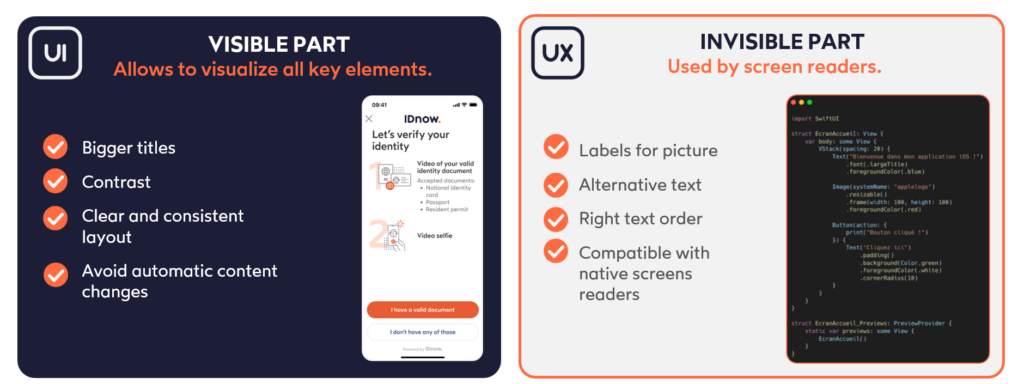
The invisible part: The user experience behind the scenes.
The invisible part is less obvious — but just as important. This is where screen readers and assistive technologies come into play. Here, accessibility is embedded directly into the code to support users who rely on auditory or tactile feedback to navigate. For example:
- Reading order: Here, code defines the logical flow that elements are read aloud by screen readers. This order must match the order of the text and visuals to avoid confusion.
- Accessible labels: Buttons and interactive elements need clear, meaningful descriptions. For example, instead of labeling a button simply as ‘Button,’ it might be described as ‘Stop onboarding’ to indicate its actual function.
- Alt text and ARIA attributes: These provide additional context for non-visual users, such as describing an image or identifying the role of a UI element.
Here’s how accessible identity verification works.
Let’s imagine a visually impaired user wanting to register for a service. She would activate her phone’s native screen reader, and the onboarding steps would be read out. For most users, it’s obvious that the ‘X’ icon in the corner closes the screen. But a screen reader can’t interpret icons visually — it depends on textual information coded into the element. That’s why it’s critical to assign a proper accessible label like ‘Stop onboarding,’ so the user knows what will happen when that element is activated.
Accessibility is about making sure that everyone — regardless of their abilities — can interact with your online service. That includes what they see and what they don’t see. Good accessibility bridges the gap between design and code, creating an inclusive experience from the top to the bottom.
Why accessibility benefits everyone.
Accessibility isn’t just about compliance — it’s about creating intuitive, efficient journeys for every user. By removing friction points and clarifying interface elements, accessibility boosts usability across the board. The result? Better customer experiences and a direct impact on conversion rates.
We are also taking the opportunity to significantly enhance the customizability of the IDnow interface, meaning customers will have more flexibility than ever to tailor the SDK’s visual appearance to their own brand guidelines.
This ensures a seamless integration into customers’ products and provides a consistent and polished experience for users from the start to the finish.
With these updates, our customers can soon deliver a more inclusive and high-converting experience — while keeping their brand identity front and center.
Read more about how video verification can help give your company a competitive edge, while providing a more inclusive experience, in our blog ‘Do verification services have an identity crisis?’
Interested in more insights from our subject matter experts? Click below!
- Senior Architect at IDnow, Sebastian Elfors explains how technical standards are moving from technical guidelines to legal foundations — and what that means for banks, fintechs, wallet providers, and every European citizen.
- Former INTERPOL Coordinator, and current Forensic Document Examiner at IDnow, Daniela Djidrovska explains why IDnow offers document fraud training to every customer, regardless of sector.
- Research Scientist in the Biometrics Team at IDnow, Elmokhtar Mohamed Moussa explores the dangers of face verification bias and what steps must be taken to eradicate it.
- Research Scientist at IDnow, Nathan Ramoly explores the dangers of deepfakes and explains how identity verification can help businesses stay one step ahead of fraudsters and build real trust in a digital world.
By

Christophe Chaput
Senior Product Owner at IDnow
Connect with Christophe on LinkedIn